
The transistor tester, transistor tester or transistor checker is an essential tool on the bench of every electronics practitioner. Although transistor tests can be performed with a multimeter, they are not very convenient because they require several measurements and a lot of attention. In other articles on this site, we will see exactly how to perform this type of test. However, assembling a transistor tester or tester is very simple, as the reader will see in this article, which leads us to recommend it for beginners.
The tester we describe in this article provides two types of indications: in addition to telling whether a transistor is good or not to be used in a project, it also allows you to evaluate its gain, that is, its amplification capacity, in two ranges. Furthermore, the described tester can be used to test common diodes and LEDs. In figure 1 we give a suggestion of a box for your assembly. Note the use of colored clamps for connection to the transistor to be tested.
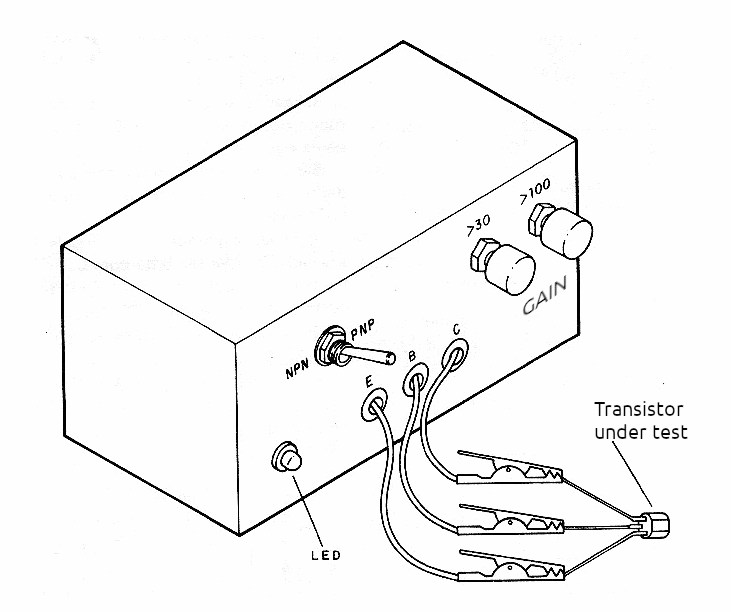
The device is powered by two small common batteries, and there is no need to use a main switch, since the clamps are kept separate, and when not in use, there is no consumption.
How it Works
Readers who have followed our Basic Electronics Course (see National Books) know how this component works, but it is always good to remember in summary: a transistor is a current amplifier. A weak direct current applied to the base of a transistor results in a much stronger current between its collector and emitter, as shown in Figure 2.
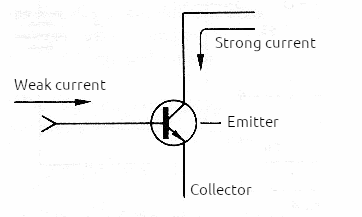
If the collector current is 100 times greater than the base current that produces it, we say that the transistor's gain is 100 or that it has an hFE = 100, or even a Beta (β) = 100. Common transistors, used in assemblies, can have gains that vary between 10 and more than 1000.
To know if a transistor is good, simply apply a weak, known current to its base and check if the collector current matches what is expected. We then connect an LED to the transistor's collector, with a series resistance, which fixes the current it must conduct. Based on this LED and the resistor, we can then place a resistor at the base of the transistor, with a value such that for the expected gain, it results in the current that turns it on.
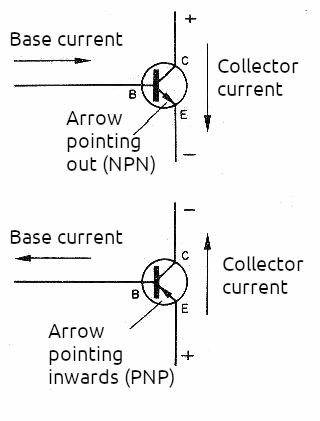
So, with a 100k ohm resistor, for the LED to light up, the transistor must have a gain of at least 100 times, and for a 27k ohm resistor, a gain of at least 30 times. However, the circuit still requires some other resources. The first is the reversal of the polarity of the batteries: there are two types of bipolar transistors, NPN and PNP, which conduct current in different ways, as shown in figure 3. The reversal to test transistors of both types is done using an H switch or 2 poles x 2 positions.
Finally we have to think about a type of defect that is common in transistors and that can give a false indication of good condition. This problem occurs when transistors are shorted between collector and emitter. If we connect an LED to the collector of a shorted transistor, it will light up even if there is no base current! It simply “ignores” the base current!
Therefore, we use two pressure switches (S1 and S2) to make the base terminal connection during running. Therefore, if before pressing these buttons, the LED is already lit with the transistor under test; it is a sign that this transistor is short-circuited and cannot be used.
Assembly
Assembly is very simple, since few components are used, as can be seen in the complete diagram of the tester, shown in figure 4.
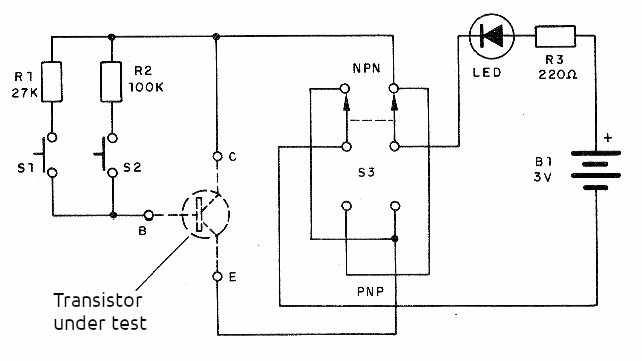
As this is an assembly recommended for beginners, we provide the terminal bridge version. More experienced readers can assemble it on a standard printed circuit board or even a universal board. The arrangement of the components on the terminal bridge is shown in Figure 5. This figure also shows the arrangement of the terminals of some of the most well-known general-purpose transistors that we use a lot in our assemblies.
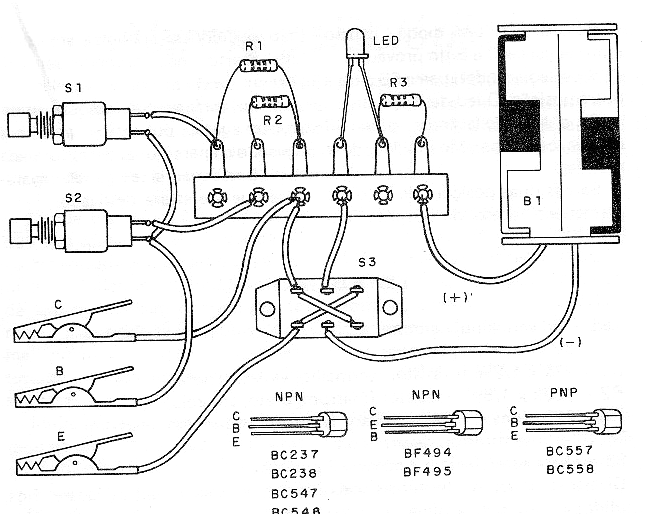
The LED used in this assembly is common, red or another color. If a green or white LED is used, it is advisable to power the device with 4 batteries instead of 2, as these LEDs only light up at higher voltages. The battery holder's polarity must be observed by the colors of the wires, also be careful with the connection of the wires on the S3 switch. The resistors are all 1/8 W or ¼ W and the switches S1 and S2 are of the “push-button” or NO type (usually open). To connect the transistors in the test, we recommend using alligator clips. They can be different colors to facilitate connection to terminals such as:
Red = emitter
Green or blue = base
Black = collector
Test and Use
Place the batteries in the holder and connect the alligator clips to any transistor, following its terminal arrangement. Switch S3 must be in the position corresponding to the NPN or PNP type. If the LED already lights up with the connection made, it is because the transistor is shorted. If it does not light up, press S2 first. If the LED lights up, the transistor is good and its gain is greater than 100. If it does not light up, press S1. If it lights up now, the transistor is good and its gain is in the range of 30 to 100. If it does not light up, the transistor is open, or has very low gain. Some BU transistors have gains in this range and cannot be tested. Transistors of the BC, BF, BD and TIP series can be tested.
To test a diode, connect it between clamps C and E of the tester. If the LED lights up move S3 to the other position, the LED should turn off. If it is off, it should light up. If the LED does not light in both positions, the diode is open. If the LED lights up in both positions, the diode is shorted.
Material List
LED – common red LED, see text
B1 – 3 V – two small batteries (or 6 V – see text)
R1 – 27 k ohms x 1/8 W – resistor – red, violet, orange
R2 – 100 k ohms x 1/8 W – resistor – brown, black, yellow
R3 – 220 ohms x 1/8 W – resistor – red, red, brown
S1, S2 – NO pushbutton switches
S3 – 2-pole x 2-position switch (H)
Miscellaneous:
Terminal strip, battery holder, mounting box, alligator clips, solder, wires, etc.
Note:
An improvement to this project consists of replacing the LED with a 0-50 or 0-200 uA microammeter in series with a 1 k ohm resistor and a 100 k trimpot. In this case, we will have the indication of the state of the transistor under test by the instrument that can even be calibrated according to the gain.


